Pong Game Example
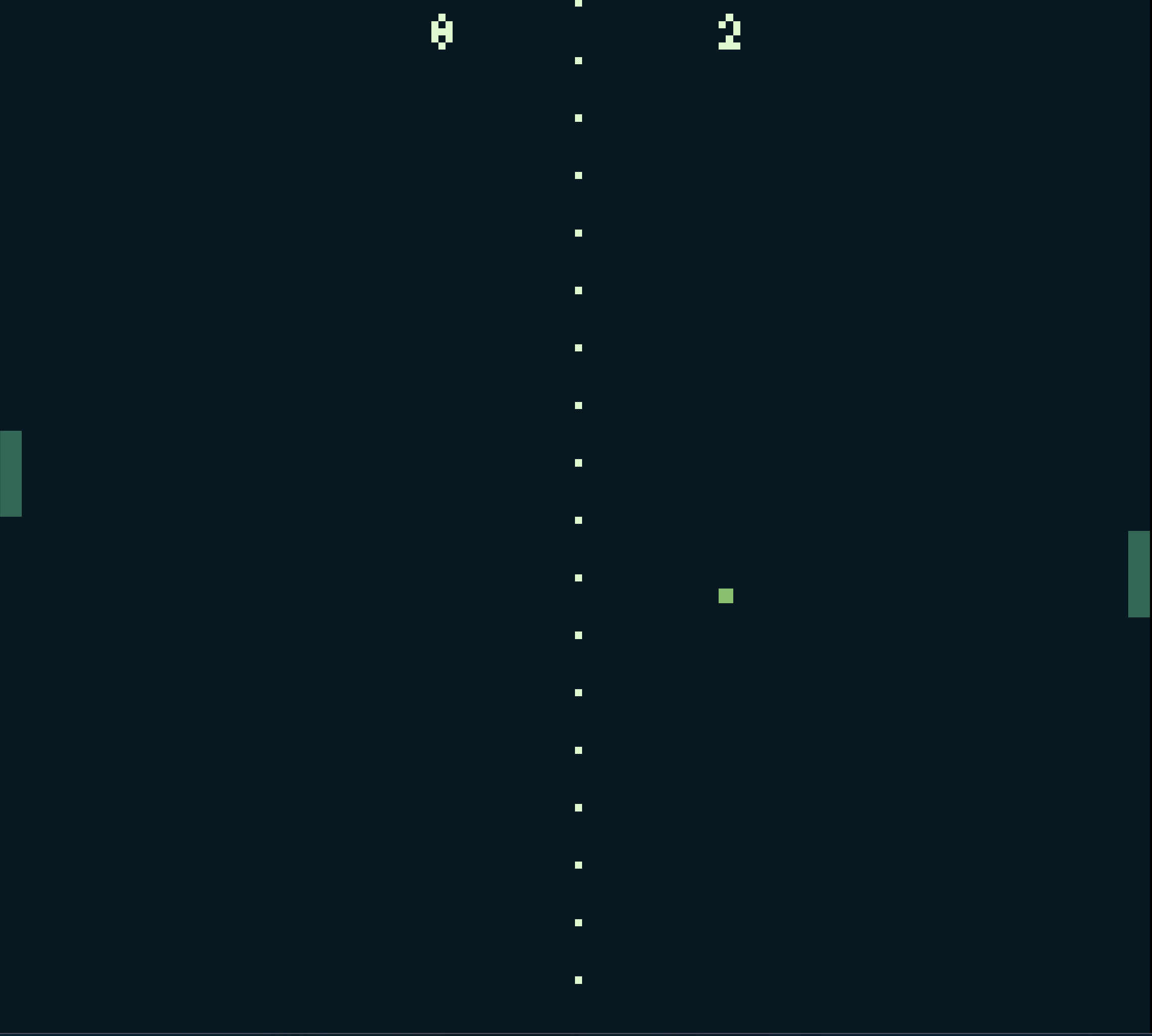
This example demonstrates a simple Pong game for akesi lili, featuring a player-controlled paddle, an AI-controlled paddle, a ball, scoring, and collision detection. It showcases game state management, input handling, AI logic, and rendering.
Explanation
The code implements a classic Pong game with one player-controlled paddle (left) and one AI-controlled paddle (right). The ball bounces off the paddles and the top/bottom of the screen. Points are scored when the ball passes the left or right edge of the screen.
Code
```koto
# Game state
g={
  # Paddle positions and size
  p1_y: 60,
  p2_y: 60,
  p_w: 3,
  p_h: 12,
  # Ball position, size, and velocity
  b_x: 80,
  b_y: 72,
  b_w: 2,
  b_h: 2,
  b_dx: -1,
  b_dy: 0.5,
  # Scores
  s1: 0,
  s2: 0,
  # Paddle speed
  p_spd: 2,
  # Ball speed
  b_spd: 1.0
}

# Initialize game
export init=||
  g.p1_y = 60
  g.p2_y = 60
  g.b_x = 80
  g.b_y = 72
  g.b_dx = -1
  g.b_dy = 0.5

# Update game state
export update=||
  # Player 1 paddle (left)
  if btn(6) and g.p1_y > 0      # Up
    g.p1_y -= g.p_spd
  if btn(7) and g.p1_y < 144 - g.p_h  # Down
    g.p1_y += g.p_spd

  # Player 2 paddle (right, AI-controlled)
  if g.p2_y + g.p_h/2 < g.b_y - 2
    g.p2_y += g.p_spd
  if g.p2_y + g.p_h/2 > g.b_y + 2
    g.p2_y -= g.p_spd

  # Ball movement
  g.b_x += g.b_dx * g.b_spd
  g.b_y += g.b_dy * g.b_spd

  # Ball collision with top/bottom
  if g.b_y <= 0 or g.b_y >= 144 - g.b_h
    g.b_dy *= -1

  # Ball collision with paddles
  if g.b_x <= g.p_w and g.b_y + g.b_h >= g.p1_y and g.b_y <= g.p1_y + g.p_h
    g.b_dx = 1
  if g.b_x >= 160 - g.p_w - g.b_w and g.b_y + g.b_h >= g.p2_y and g.b_y <= g.p2_y + g.p_h
    g.b_dx = -1

  # Ball out of bounds (score)
  if g.b_x < 0
    g.s2 += 1
    g.b_x = 80
    g.b_y = 72
    g.b_dx = 1
    g.b_dy = 0.5
  if g.b_x > 160
    g.s1 += 1
    g.b_x = 80
    g.b_y = 72
    g.b_dx = -1
    g.b_dy = 0.5

# Render game
export draw=||
  clear 0
  fill_rect 0, g.p1_y, g.p_w, g.p1_y + g.p_h, 1
  fill_rect 160 - g.p_w, g.p2_y, 160, g.p2_y + g.p_h, 1
  fill_rect g.b_x, g.b_y, g.b_x + g.b_w, g.b_y + g.b_h, 2

  # Draw scores
  txt "{g.s1}", 60, 2, 3
  txt "{g.s2}", 100, 2, 3

  # Draw center line
  for i in 0..18
    pix 80, i*8, 3
```

## How It Works

1. **Game State**: The `g` object stores the positions, sizes, and velocities of the paddles and ball, as well as the scores.
2. **Initialization**: The `init` function resets the game state, placing the paddles and ball in their starting positions and setting initial velocities.
3. **Input Handling**: In the `update` function, the left paddle is controlled using buttons 6 (up) and 7 (down).
4. **AI Logic**: The right paddle is controlled by the AI, which moves the paddle to follow the ball's vertical position, with a small offset to make the game playable.
5. **Ball Movement**: The ball moves according to its velocity (`g.b_dx` and `g.b_dy`). Collisions with the top and bottom of the screen reverse the vertical velocity.
6. **Collision Detection**: The ball bounces off the paddles when it collides with them. The collision logic ensures the ball touches the paddle before bouncing.
7. **Scoring**: If the ball passes the left or right edge of the screen, the opposing player scores a point, and the ball is reset to the center.
8. **Rendering**: The `draw` function clears the screen, draws the paddles and ball as filled rectangles, displays the scores as text, and draws a center line using individual pixels.

This example demonstrates how to create a complete, playable game in akesi lili, including game logic, input handling, AI, and rendering.